Digital Signage for Transportation: Airports, Stations and Transit Hubs
Digital signage for transportation environments is among the most technically demanding category of signage deployment. Airports, train stations, bus terminals, and transit hubs require screens that operate 24 hours a day, display real-time data from multiple live feeds simultaneously, and remain readable in environments ranging from bright atrium daylight to dim underground platforms. This guide covers the hardware, software, and integration requirements from an IT and operations perspective.
It covers the whole transportation industry, not only the big airports: regional stations, bus networks, ferry terminals, depots and vehicles. You will find where each type of screen is used, which data standards feed them, what the hardware has to withstand, how the software options differ, what accessibility rules apply in Europe and the UK, and a checklist for procurement.
Quick verdict
Transportation signage is a specialist category. Off-the-shelf retail or office signage platforms rarely handle the real-time data integration, 24/7 reliability requirements, or the accessibility rules that transport operators must meet. For most transport authorities and airport operators, the choice is between enterprise digital signage platforms with strong API integration capabilities and specialist transport information systems (TIS) designed specifically for the category. Understanding which is appropriate for your scale and complexity is the first decision.
In practice many operators end up with both: a specialist system for the safety-critical departure and arrival boards, and a general signage platform for wayfinding, service updates, staff screens and advertising. The important part is deciding up front which system owns which screen, and how an emergency message reaches all of them.
Where digital signage is used in transportation
| Setting | Typical screens | Main data source |
|---|---|---|
| Airports | Flight information displays (FIDS), baggage (BIDS) and gate (GIDS) screens, wayfinding, security queue times, advertising | The airport operational database and airline feeds |
| Rail stations | Departure boards, platform displays, service disruption screens, ticket hall information | Rail operator or infrastructure manager real-time feeds |
| Bus and tram stops | Real-time arrival displays, often e-paper or LED at stops, LCD in interchanges | GTFS-RT or SIRI feeds from the transit authority |
| Vehicles | Next-stop displays, route maps, service messages and advertising in buses, trams and trains | On-board computer with vehicle location |
| Ferry and port terminals | Departure and boarding screens, check-in queues, weather and sea conditions | Booking and departure systems |
| Depots and driver rooms | Duty rosters, safety notices, route changes, internal news | Workforce scheduling systems and internal comms |
That last row is easy to forget. Drivers and maintenance crews are classic frontline workers who rarely see email, and depot screens are one of the cheapest wins in the whole programme. Our guide to digital signage for internal communications covers that side.
What makes transportation signage different
24/7 operational requirements
Transport hub signage cannot have maintenance windows. A screen that goes blank at 03:00 in an airport terminal with overnight travellers is an operational incident, not a minor inconvenience. Hardware must be commercial-grade with 24/7 ratings, redundant power, and remote management capabilities that allow monitoring and restart without a site visit. Mean-time-to-repair for critical displays needs to be contractually defined with hardware suppliers and facilities teams.
Write that into the contract, not just the specification. Our article on digital signage SLAs covers uptime definitions, response times and penalties.
Real-time data integration
The defining technical requirement of transport signage is live data. Departure boards need to pull from airline or train operator systems in real time. Gate changes, delays, and platform assignments must propagate to screens within seconds, not minutes. This requires:
- Direct integration with the transport operator’s data API (SITA for aviation, National Rail APIs for UK rail, GTFS-RT for public transit)
- Fallback content and display states for when data feeds are unavailable
- Sub-10-second data refresh cycles for time-critical information
- Redundant data feed paths to prevent a single API failure from blanking all departure boards
The common feed standards are worth knowing by name, because they decide how much custom work a platform needs:
- GTFS and GTFS Realtime: the de facto standard for public transit timetables and live updates, published openly by many transit agencies.
- SIRI: the European CEN standard for real-time public transport information, widely used by European operators alongside or instead of GTFS-RT.
- Rail operator feeds: national systems such as the UK’s National Rail data feeds, usually with their own registration and terms.
- Aviation: flight data comes from the airport operational database, which in turn takes airline messages; FIDS suites from specialists such as SITA sit on top of that.
Ask every vendor which of these it reads natively and which needs middleware. “We have an API” is not the same as “we read your SIRI feed out of the box”.
Mixed audience and multilingual requirements
International airports and major transit hubs serve passengers who speak dozens of languages. Signage platforms need to support Unicode rendering correctly across all character sets, RTL (right-to-left) text for Arabic and Hebrew, and automated translation workflows or multi-language content scheduling. This is a non-trivial technical requirement that eliminates platforms with limited internationalisation support.
Hardware specifications for transport environments
Display brightness requirements by zone
Brightness requirements vary dramatically by location within a transport facility:
- Indoor atrium and naturally lit zones: 700-1000 nits minimum. Standard 500-nit commercial displays wash out in bright atrium conditions.
- Semi-outdoor (covered bus bays, outdoor-facing windows): 1500-2500 nits. High-brightness commercial displays required.
- Outdoor platforms and external wayfinding: 2500-5000 nits. Outdoor-rated commercial displays with IP65 or higher ingress protection ratings, operating range -20C to 60C.
- Underground platforms and dark zones: 400-600 nits acceptable; anti-glare coatings important where lighting is mixed.
Our outdoor digital signage buyer’s guide goes deeper on high-brightness panels, enclosures and thermal management.
LCD, LED or e-paper?
Not every transport screen should be an LCD. LED boards remain common for platform and stop displays because they are bright, durable and readable at a distance, though they show less detail. E-paper has become a popular choice for bus and tram stops: it reads well in direct sunlight, uses very little power and can run from solar panels or batteries where there is no mains supply, at the cost of slow refresh and limited colour. LCD is the default for indoor concourses, interchanges and anywhere that needs video or rich layouts. Our e-paper vs LCD comparison explains the trade-offs in more detail.
Ingress protection and vandal resistance
Public transport environments require displays rated for public access conditions. Key hardware requirements beyond brightness:
- IP54 or higher for covered outdoor areas; IP65 for fully exposed outdoor locations
- IK-rated (EN 62262) vandal resistance for public-facing installations, particularly at platforms and concourses
- Tempered glass front panels to prevent cracking from impact or temperature cycling
- Sealed enclosures for locations exposed to dust, humidity, or salt air (coastal transport hubs)
Rolling stock adds its own layer: on-board screens have to cope with vibration, wide temperature swings and the vehicle’s power supply, and rail equipment usually has to meet railway-specific standards such as EN 50155. In-vehicle displays are therefore usually bought from specialist suppliers rather than adapted from building signage.
Passenger information display cases
Many transport authorities use purpose-built passenger information display (PID) enclosures rather than bare commercial displays. These enclosures provide the mechanical protection, thermal management, and mounting flexibility that transport environments require. Specialist suppliers including Armagard, Peerless-AV, and Havis manufacture transport-specific enclosures for commercial display panels.

Wayfinding architecture for large transport hubs
Wayfinding in airports and major stations is a discipline in its own right. Key principles for transport wayfinding signage:
Decision point placement
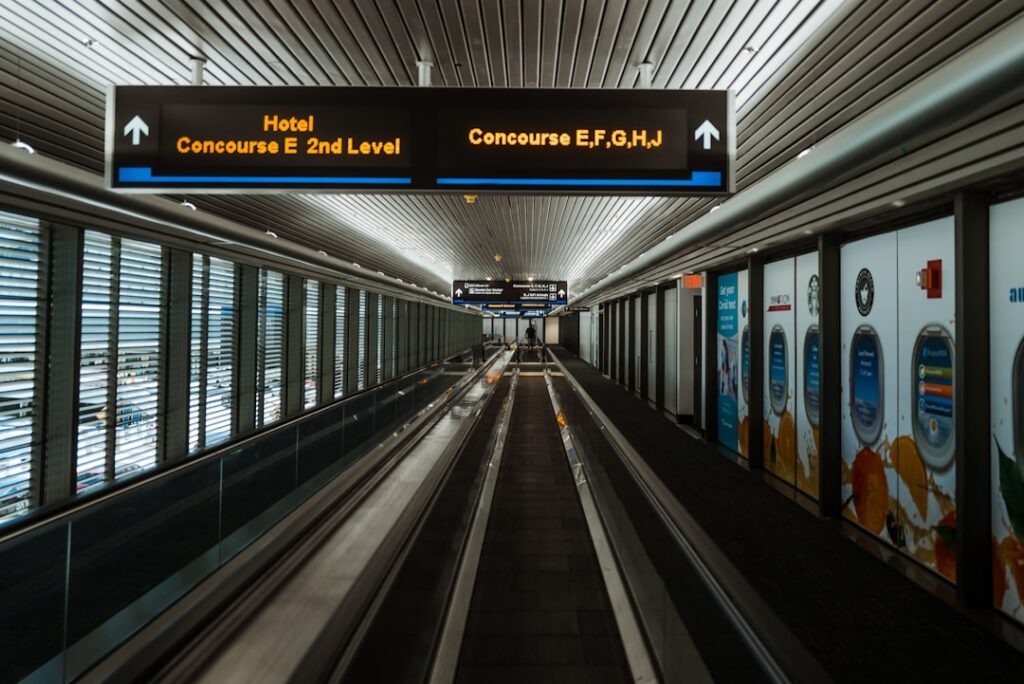
Wayfinding signs must be positioned at every point where a passenger needs to make a navigation decision – not just at central points. At an airport, this means: arrivals hall exit, baggage reclaim entry, security queue entry, departures split for gates, and at the entrance to each gate area. Gaps in coverage force passengers to backtrack or ask staff, which increases the support load on ground crew.
Consistent visual hierarchy
Large transport facilities typically establish a visual hierarchy for signage content: safety-critical information (emergencies, evacuations) overrides all other content; live operations information (departures, arrivals, delays) takes precedence; wayfinding and facilities information fills remaining screen time. The signage platform must support priority-based content interruption – the ability to push emergency content to every screen simultaneously, overriding all scheduled content.
Interactive kiosks vs passive displays
Touch-enabled kiosks allow passengers to look up specific flight or journey information, but require higher maintenance than passive displays (touch surfaces attract grime and are vulnerable to vandalism). The most effective transport wayfinding strategies use passive displays for directional and real-time operations information, with interactive kiosks as a supplement for detailed journey planning, maps, and FAQs.
Static signs still do most of the work. Digital screens add value where information changes: platform assignments, disruptions, queue times, closed routes. Our guides to setting up wayfinding screens and hotel and resort wayfinding cover the design principles, which carry over to stations and terminals.
Software platform options for transport
| Platform type | Best for | Real-time data | Typical use case |
|---|---|---|---|
| Enterprise signage platforms (TDM Signage, Appspace, Poppulo) | Commercial airports, transit authorities with internal IT | API integration required | Mixed content: wayfinding + commercial + real-time data |
| Specialist TIS and FIDS platforms (for example SITA and other airport or rail specialists) | Large international airports, national rail operators | Native, purpose-built | Pure operations: departures, arrivals, FIDS |
| Cloud signage platforms (ScreenCloud, Yodeck, OptiSigns) | Small regional airports, bus stations, ferry terminals | Via widgets and API | General wayfinding, commercial content, basic timetables |
For most regional airports, municipal transit authorities, and smaller transport operators, a cloud-based enterprise signage platform with API data feed capability provides the right balance of flexibility, cost, and operational simplicity. The large specialist TIS platforms are built for the scale and complexity of major international airports and national rail networks, and are priced accordingly.
TDM Signage is used in several European transport deployments. Its flexible API-based data integration and European data residency make it a reasonable option for transport operators with GDPR data handling requirements. Check feature details and pricing at tdmsignage.com.
When you compare platforms, test them against your own feed during the evaluation, not a demo feed. Points to check: how the screen behaves when the feed drops (does it show the last known data with a timestamp, a fallback message or nothing?), how fast a change reaches the screen, whether layouts handle long station names and many languages, and whether the platform can run on locked-down players without staff touching them. For pricing benchmarks on the cloud platforms, see our digital signage software pricing comparison.
Advertising and revenue
Many stations and airports fund part of their screen network with advertising. That changes the requirements: ad-serving and proof-of-play reporting, integration with programmatic digital out-of-home (DOOH) platforms, and strict rules so that advertising never interrupts or resembles safety and service information. In larger networks the advertising screens are often run by a media concession partner on separate hardware. If you share screens, make sure the priority rules are technical, not only contractual: a delay or evacuation message must be able to pre-empt any advert immediately.
Network and resilience requirements
Transport signage network infrastructure needs to be designed for resilience, not just connectivity:
- Dual network paths for critical departure board locations, with automatic failover
- Local content caching on media players so recent content continues displaying during internet outages
- Cellular (4G/5G) backup for platforms and remote locations where fixed network is unreliable
- Network monitoring integrated with the signage platform monitoring to correlate device outages with network failures
- Dedicated VLAN for signage, isolated from ticketing, payment, and operations networks
Transport networks are critical infrastructure, and in the EU many operators fall under the NIS2 cybersecurity rules. Treat signage players as networked endpoints: hardened operating systems, no default passwords, signed updates and logging. Our guides to digital signage network planning and securing digital signage systems cover the details.
Compliance and accessibility
Transport operators in most jurisdictions have specific accessibility requirements for passenger information displays. In the EU, the European Accessibility Act requires digital information services to meet EN 301 549 accessibility standards from June 2025. In the UK, the Equality Act and PRM (persons with reduced mobility) Technical Specifications for Interoperability apply to rail and major transport hubs. Minimum requirements typically include:
- WCAG 2.1 AA minimum contrast ratios for text and background
- Minimum character heights for directional information, set by reading distance in the applicable standard (platform boards read from 20 to 25 metres need far larger text than a concourse screen)
- Audio supplements for blind or visually impaired passengers at key points
- Tactile and Braille supplements at kiosk touchpoints
Check the exact figures in the standard that applies to your mode and country rather than copying them from another operator. Our article on digital signage accessibility covers WCAG for screens in more depth.
Procurement checklist
- Map every screen to an owner system: specialist TIS, general signage platform or advertising partner.
- List your data feeds (GTFS-RT, SIRI, rail or airport systems) and ask which ones each vendor reads natively.
- Define the fallback state for every screen type when data or network fails.
- Specify brightness, IP and IK ratings per zone, and the operating temperature range.
- Require remote monitoring, alerting and remote reboot for every player.
- Test the emergency override across all systems, including advertising screens.
- Check accessibility against EN 301 549 or your national standard.
- Agree uptime, response and repair times in the contract.
- Ask about player security, update policy and data hosting location.
- Pilot on one station, terminal or route before rolling out. Our guide to deploying 50+ screens covers the rollout itself.
FAQ
What is digital signage in the transportation industry?
It covers all screens used to inform passengers and staff in transport settings: departure and arrival boards, platform and stop displays, in-vehicle screens, wayfinding, service disruption notices, advertising and depot screens for drivers and crews.
Can a normal digital signage platform show live departures?
Often yes, through a data widget or API integration with GTFS-RT, SIRI or an operator feed. For small stations and bus terminals that is usually enough. For safety-critical boards at large airports and national rail stations, operators normally use a specialist system.
Why are e-paper displays used at bus stops?
They are readable in direct sunlight and use very little power, so they can run on solar panels or batteries at stops without a mains connection. The trade-off is slow refresh and limited colour, which is fine for arrival times.
How bright should outdoor transport displays be?
Fully exposed outdoor screens generally need 2,500 nits or more; covered bus bays and window-facing screens around 1,500 to 2,500 nits; bright indoor concourses about 700 to 1,000 nits.
What accessibility rules apply to passenger information screens?
In the EU the European Accessibility Act, with EN 301 549 as the reference standard, applies to digital passenger information. In the UK the Equality Act and, for rail, the PRM technical specifications apply. Contrast, text size, audio alternatives and accessible kiosks are the usual requirements.
Bottom line
Digital signage for transportation requires hardware and software that most standard office or retail deployments do not. The reliability bar is higher (24/7 uptime expectations), the data integration is more complex (real-time feeds from live operations systems), and the physical environment is more demanding (brightness, ingress protection, vandal resistance). Transport operators planning a signage refresh should evaluate platforms specifically against these requirements rather than adapting a general-purpose signage platform. For related reading, see our guides on wayfinding screen setup and digital signage security.